

Fine-tune character details with model separation for flexible creative control.
Model Separation With Ease
Separate a trained character model into content and style components to create flexible variations, new combinations, and unique game-ready results.
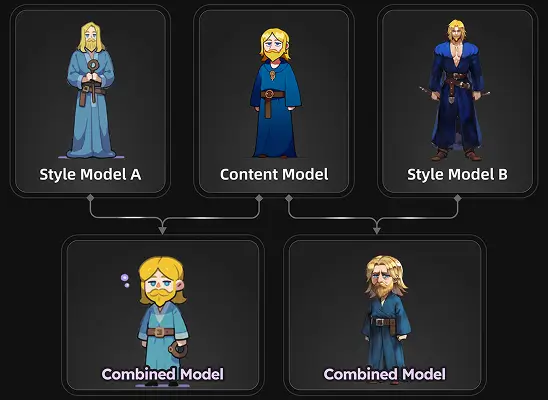
Why use AI Model Separating

Generate fresh design variations by combining models without full retraining.
Maintain character proportions while exploring new styles using model separation.
Create commercial-ready designs by mixing models and refining components.
How to Use the Model Separation
- 1
Import Training Images
Upload your image set in the "Train" section, and the system will automatically apply model separation to separate shape and style.
- 2
Select Training Type and Theme
Choose "Characters" as your training type and pick the Anime Character theme to guide the model toward accurate linework, shapes, and proportions suitable for separation.
- 3
Pick Training Model
Select the "HOLO A1" model, which is optimized for anime and cartoon characters, and prepares the structure needed to separate models by components.
- 4
Enable Separation Mode
Toggle on "Model Separation Training" to split your trained model into content and style components, which allows flexible combinations and new character variations without retraining.
When to use AI Model Separation
Multiple Character Styles
Create new visual themes by separating models by components, allowing you to generate multiple styles for one character while keeping proportions consistent.
Fast Character Variations
Ideal for teams that need quick updates by mixing separate models without rebuilding entire datasets. Commercial-ready results ensure variations are instantly production-ready.
Expand Single Styles
Helpful when creators want to separate models and apply different brushwork or palettes while maintaining established character identity.
Modular Design Pipelines
Ideal for workflows that demand flexible design changes by separating models by components and recombining them for rapid iteration.
Start with Pre-built Models
No data available